
Mobile Ticketing | Pittsburgh Steelers - Steelers.com
Make sure you have the latest Apple or Android software to add ticket(s) to your wallet: If the option to add your tickets to your wallet is not visible on your ticket, update your phone's software and try again.
Save your ticket(s) to your phone's digital wallet BEFORE heading to Acrisure Stadium: This ensures you have access to your ticket in the event Wi-Fi or cellular connections are unavailable.
Download the latest version of the Steelers App on your Apple or Android device:
ACCESS AND SAVE YOUR TICKETS

Tap "Tickets" in the Bottom navigation, then "My Tickets"

Tap "Sign into Steelers" at the bottom

Once you are signed with your Steelers Account Manager and Ticketmaster account, select the game
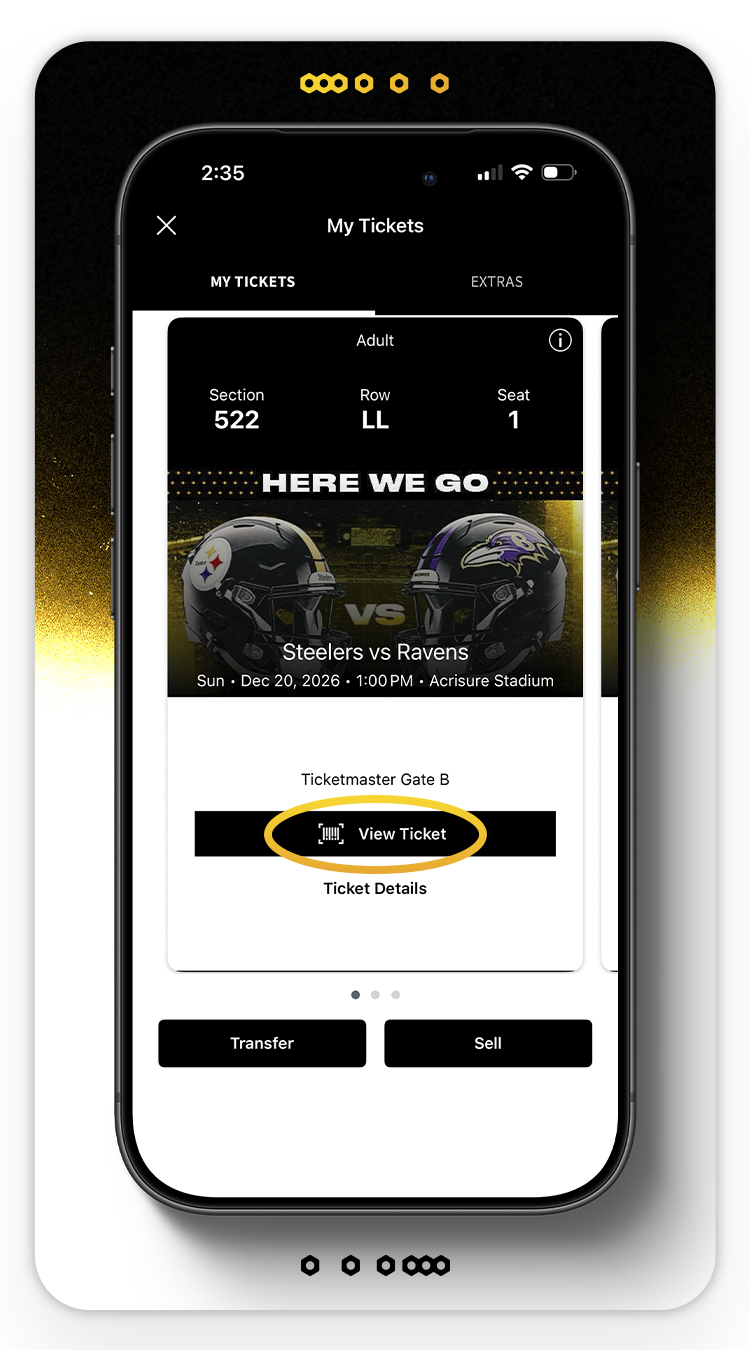
Tap "View Tickets", then "Add to Apple/Google Wallet" and confirm which tickets to add. Once complete, your tickets will be accessible within your phone's wallet
TRANSFER YOUR TICKETS

Select the game; tap "Transfer"
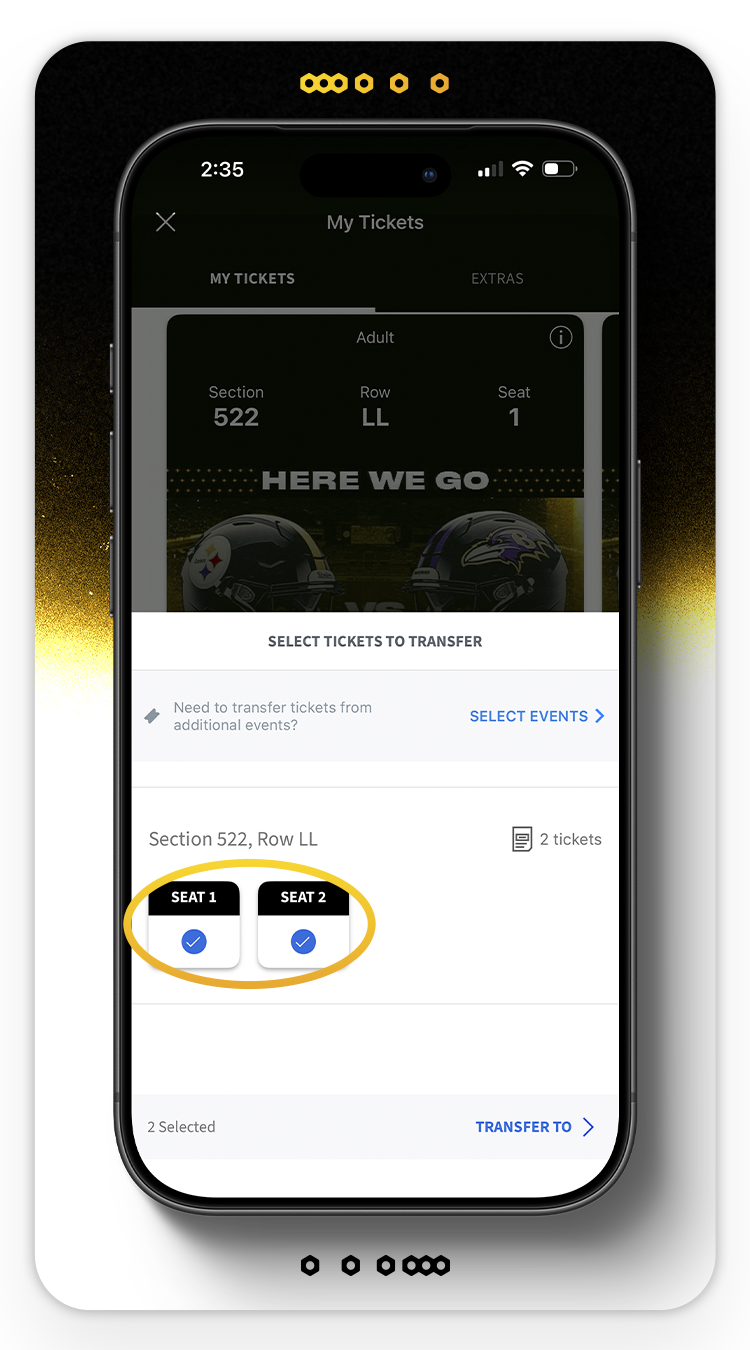
Select the seats to transfer and tap "Transfer to"
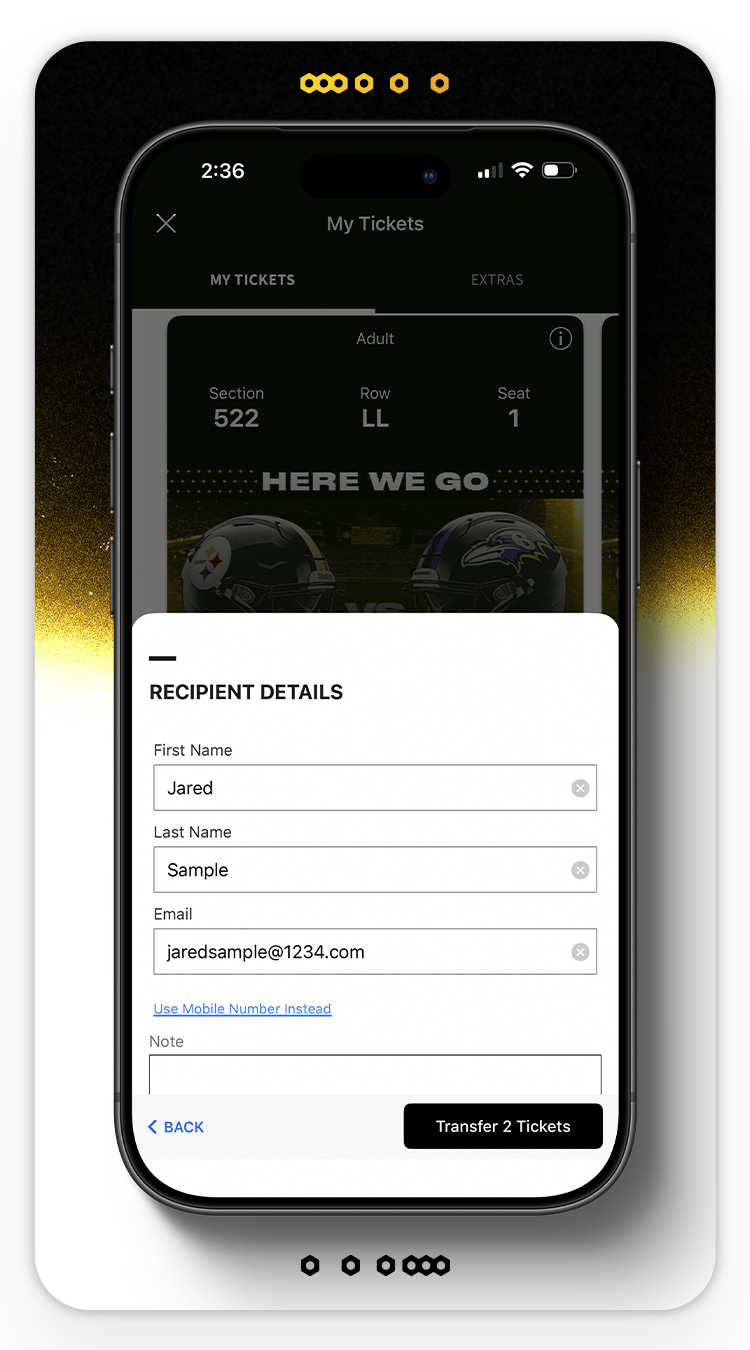
Select from your existing phone contacts or manually enter a recipient's email or cellphone number (if using desktop, sending by email is the only option)
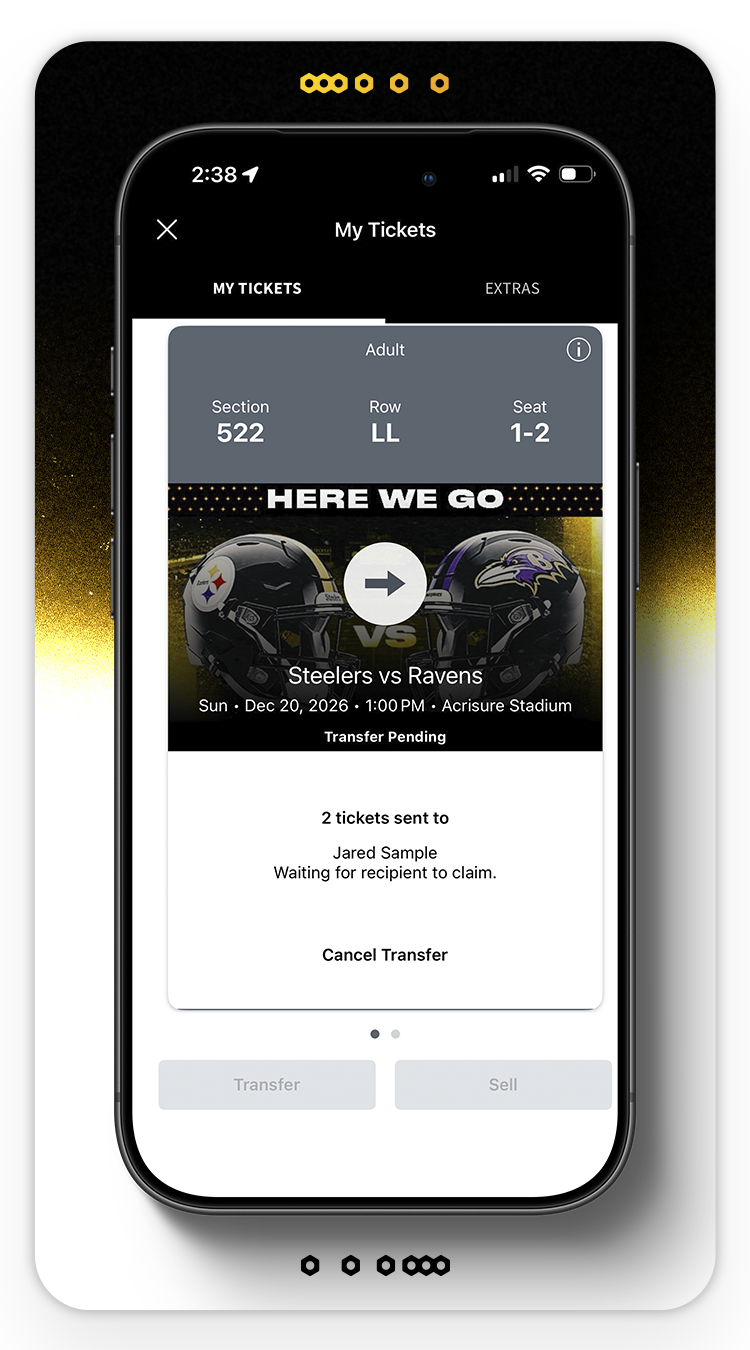
Tap "Transfer Ticket" to send the tickets to the recipient
ACCEPTING TICKETS SENT TO YOU

If transfer was sent by email, tap "Accept Tickets" in the email you received

If transfer was sent by text, tap the link in the text message that you receive

Sign in with your Ticketmaster email and password. If you don't have one, you can easily make one by typing in your preferred email in
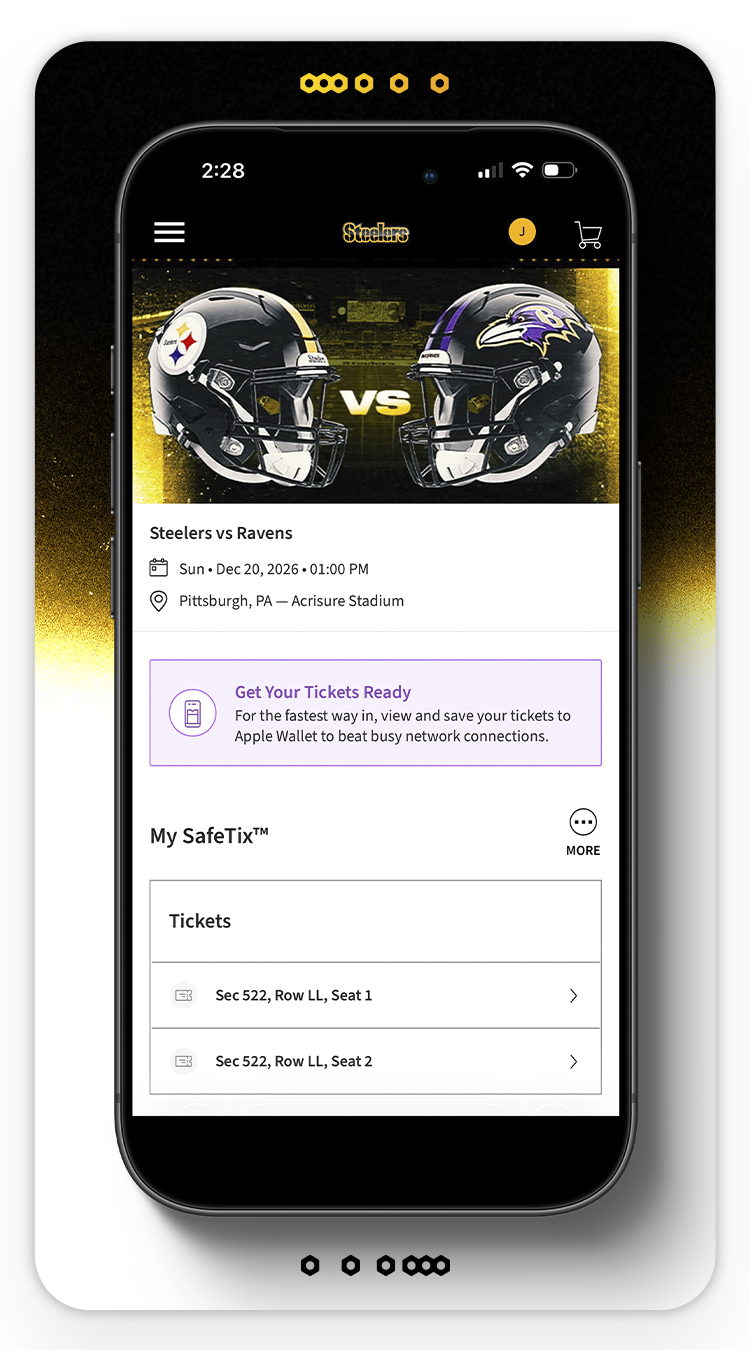
Once you are signed in with your Ticketmaster account, your ticket transfer will be accepted. Be sure to save your tickets to your digital wallet
SELL YOUR TICKETS

Select the game you would like to sell and tap the "sell" button

Select the seats you wish to sell, then tap "Continue"
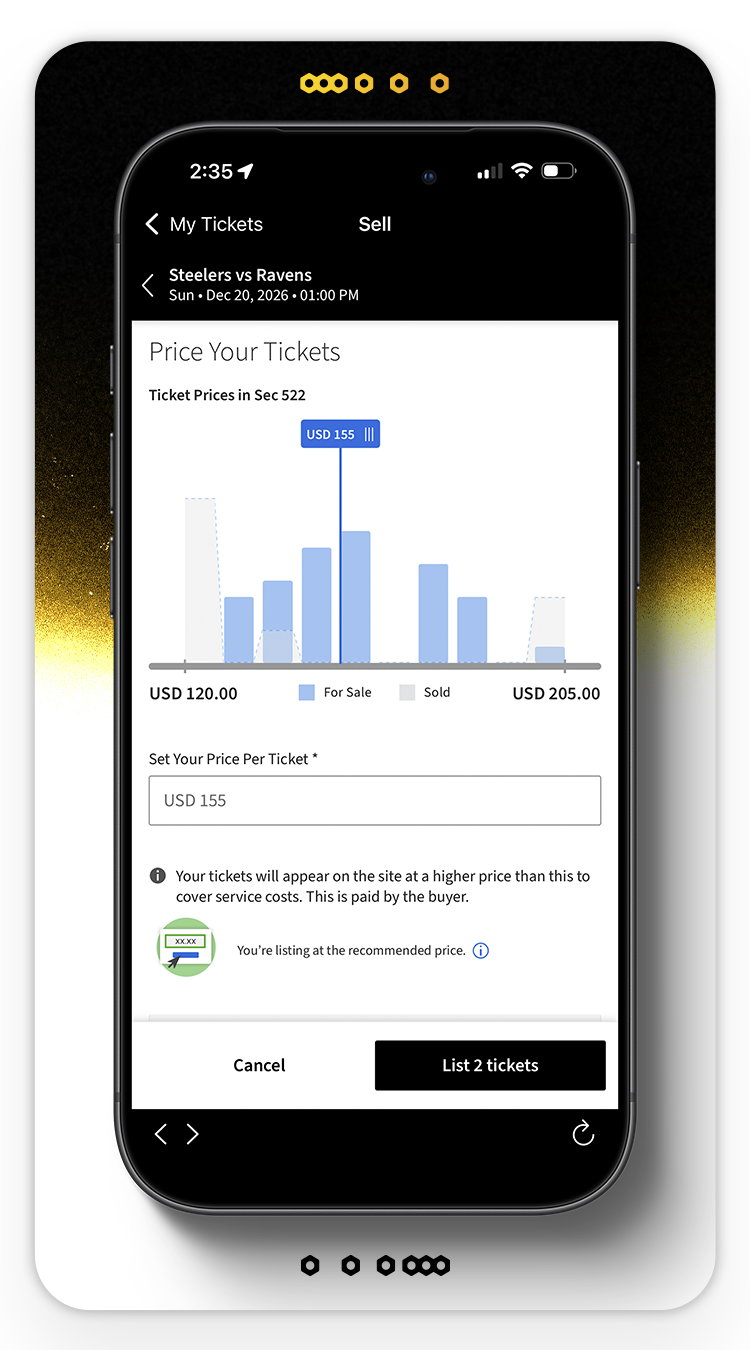
Set the price per ticket in the box provided and scroll down to select how you would like to get paid out

Choose your payout method, then tap "List Tickets" to post your tickets for sale. Once listed, your tickets will be available on Ticketmaster
FREQUENTLY ASKED QUESTIONS
How do I access my ticket(s) on my mobile device?
Use the Steelers Official Mobile App to access your ticket(s) by selecting the "Tickets" tab on the toolbar and log in to your Steelers account. You can access the Steelers Official Mobile App here.
My ticket does not have a barcode. Is it valid?
If using an Apple or Android device, your ticket will say "hold near reader" once saved to your digital wallet and is valid for entry. Be prepared to scan this screen as you approach the ticket takers. If using an Android device, please make sure your NFC is turned ON in your phone settings.
Can I screenshot my ticket(s) to present to the ticket scanner?
No. To help prevent ticket fraud, mobile tickets have a dynamic barcode. Screenshots or images of tickets are not valid and will not permit entry to Acrisure Stadium.
Can I print my ticket(s) from home?
No. Tickets are mobile only and must be accessed on a mobile device.
Can I have multiple tickets on my phone?
Yes, though it is recommended that you transfer tickets to each of your guests. However, if arriving/entering the gates together, you may save all tickets to one device and swipe left through the tickets to scan them individually.
What if my entire party is not with me when I enter Acrisure Stadium?
If you do not plan to arrive together, before heading to the North Shore, transfer your tickets to your guests so each person has their individual ticket saved to their mobile device in advance of gameday.
Why should I save my ticket(s) to my phone?
Saving your ticket to your digital wallet before arriving at the stadium ensures you can access the barcode should you lose cellular or WiFi service.
What should I do if I do not have a smartphone or if my phone is lost, breaks or dies before I get to the stadium?
Please visit our Customer Service Windows located on Art Rooney Avenue for assistance. Customer Service windows open 3 hours prior to kickoff.
What if my smartphone is outdated and I'm having issues accessing my tickets?
If you have an outdated smartphone model, some functionality with the Steelers app or Account Manager may not be available. If you experience any issues with this, please contact us prior to gameday at 412-323-1200 or visit the Ticket Office windows which open 3 hours prior to kick-off on gameday.
When I have issues with my mobile tickets, who can I contact?
Fans with question or needing further help should contact us at 412-323-1200. Our office hours are Monday through Friday 9 am-5 pm and on gameday 3 hours prior to kickoff. Or visit the Ticket Office windows located at the corner of Art Rooney Avenue and West General Robinson on gameday starting 3 hours prior to kickoff.
Why do I need to fill out a 1099-K Form with Ticketmaster when I sell my tickets?
Ticketmaster will need to collect your taxpayer information in accordance with applicable laws.
Please login to their secure Seller Tax Details page and submit your taxpayer information, including Name,
Address, Phone Number, and Taxpayer Identification Number (TIN). After your tickets are sold and they
validate your account and taxpayer information, they will deposit your payout typically within 5-7 business days.
For more information, please refer to their FAQ.